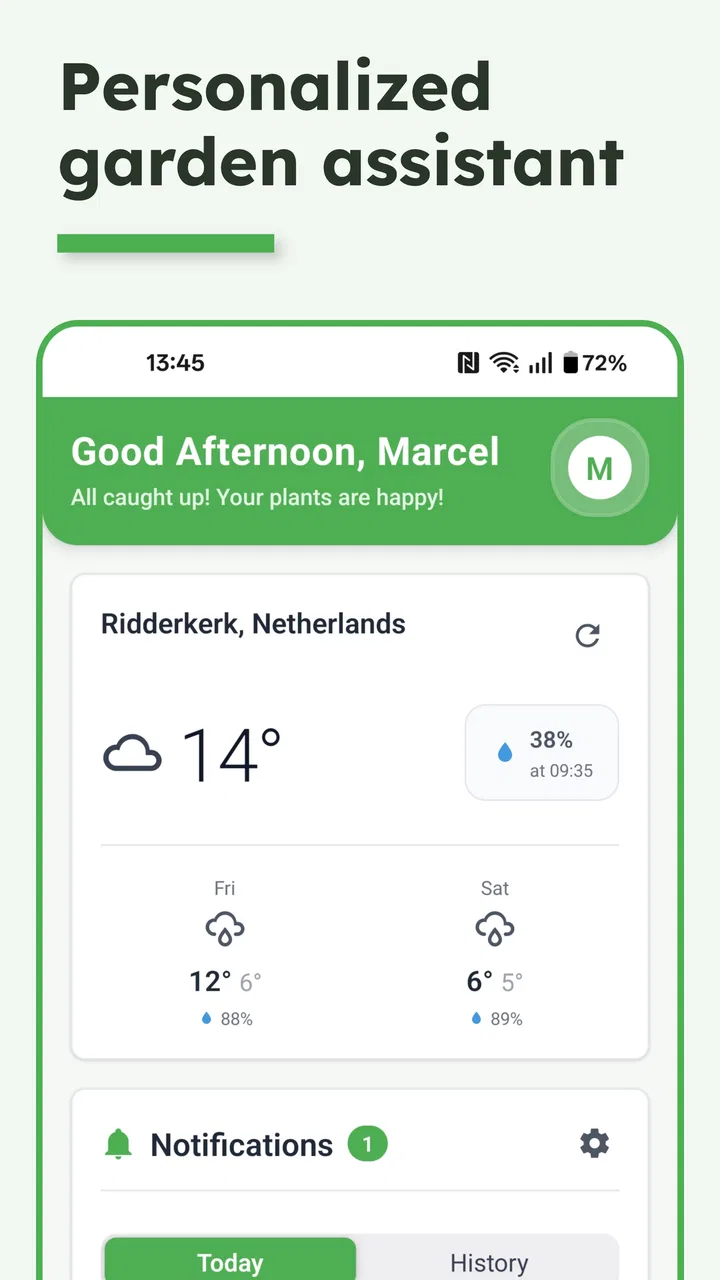
Verdy - AI Garden Assistant
- 0.0
- Rating
- 50.00K
- Installs
- Free
- Price

 Analysis by App-foxy
I like plant apps that stay practical. A garden assistant should help me remember what needs attention, explain what I am seeing, and reduce the small amount of guesswork that often makes plant care frustrating. Verdy - AI Garden Assistant takes that focused approach. It is a free House & Home app from Cloudhints, built around plant tracking, care tasks, and growing advice rather than trying to become a complete social network or a general home-management tool.
After spending time with it, my impression is that Verdy makes the most sense for someone who wants a simple digital notebook with reminders and guidance. It can be useful for a windowsill collection, a few balcony pots, or a small garden where the main problem is remembering routines. I would not treat it as a substitute for careful observation, local horticultural knowledge, or a specialist diagnosis. Its value is in organizing attention, not in making plant care automatic.
The app has a store rating of 0.0 and more than 50 thousand installs, so those figures should be read carefully rather than treated as a judgment of quality. It is marked for Everyone, costs nothing to download, and runs on Android 7.0 or later. Cloudhints lists version 1.3.4, while the release date is November 14, 2025. Those details make it accessible to people using older Android phones, although the experience will still depend on the device and the way the app handles its current features.
You May Also Like

 AccuWeather: Weather Radar
AccuWeather Review: A Quick, Clear Forecast for Everyday Decisions
For everyday plans, the best forecast is the one you can understand quickly. AccuWeather makes rain timing, radar, and local conditions easy to act on, with a few trade-offs.

 Hill Climb Racing
Why Hill Climb Racing Still Turns Crashes Into One More Run
A tiny car, a bumpy hill and one more upgrade: Hill Climb Racing keeps resurfacing because its simple chaos makes every near-miss feel personal.

 AliExpress - Shopping App
AliExpress Makes Global Shopping Feel Personal, but Shoppers Bear the Risk
AliExpress turns a global marketplace into a pocket-sized discovery engine. Its reach is useful, its shopping loop compelling, and its trade-offs easy to miss.

 Lords Mobile: Kingdom Wars
Lords Mobile Is a Kingdom-Building Routine, Not a Quick Match
A case-by-case verdict on the building, battles, device demands, and social commitments that make Lords Mobile rewarding for some players and exhausting for others.

 PDF Scanner app - TapScanner
TapScanner Makes Paperwork Easier to Capture, Check, and Share
TapScanner makes scanning with a phone feel less like a rescue operation and more like a dependable step in getting work done. Its capture tools are useful, though not flawless.

 Block Blast!
 Shows How Much a Puzzle Game Can Leave Out
A quiet grid game shows why puzzle players increasingly value instant clarity, repeatable skill and low-pressure play—and where the genre still needs to catch up.
More From Our News Desk
View All News


What Verdy is really useful for at home
The strongest idea here is not the promise of “AI” by itself. It is the combination of a plant record and a care routine. When I have several plants with different needs, the hard part is rarely knowing that plants need water. The hard part is remembering which one was watered, which one was moved, and which one needs checking after a change in light or temperature. A dedicated record gives those observations somewhere to live.
I would begin by adding plants one at a time instead of trying to build a complete collection in one sitting. That makes it easier to use consistent names and note where each plant lives. A useful label might be “kitchen window basil” rather than simply “basil.” That small distinction matters when the same kind of plant appears in more than one location, because care decisions are influenced by light, airflow, pot size, and how quickly the soil dries.
The care-task side is most helpful when I use it as a prompt to inspect the plant, not as an instruction to act blindly. If a task says a plant needs attention, I would still check the soil, leaves, pot drainage, and recent weather before watering. This is one of the app’s important trade-offs: a reminder can prevent neglect, but a fixed routine can encourage overwatering if I follow it without looking at the plant.
That is also where the growing tips can be valuable. Advice is easier to use when it is connected to a specific plant and a specific moment. A new plant owner may need a plain explanation of what to watch for, while an experienced gardener may use the same tip as a quick reminder. I found the best approach is to treat suggestions as a starting point and then compare them with what I can actually see.
A realistic weekly routine
Imagine I have a fern in the bathroom, herbs on a bright kitchen sill, and a flowering plant near a cooler window. On a busy weekday, I open Verdy and check the care tasks rather than relying on memory. I inspect the fern for dry soil and brown edges, look at the herbs for drooping stems, and check whether the flowering plant is sitting in a draft. I then record only the actions I actually took.
That workflow is more useful than marking everything complete in one tap without looking. Over time, the records can help me notice patterns: perhaps the herbs need checking more often than the flowering plant, or perhaps the fern’s soil remains damp longer than expected. The app does not replace that reasoning, but it gives me a place to build it. This is a non-obvious strength for beginners: the act of recording care can teach them how quickly their own home conditions change the routine.
For a small collection, I would set aside one short weekly review. I would look for overdue tasks, remove habits that no longer fit the season, and check whether any plant has been moved. A plant that changes rooms should not necessarily keep the same care assumptions. Treating the app as a living log rather than a permanent schedule prevents the tool from becoming another source of noise.
Where the assistant fits beside familiar alternatives
The usual alternative is a paper notebook or a note-taking app. Those options are flexible and private in a familiar way, but they require me to design my own structure. Verdy is more appealing when I want plant-related organization already shaped around care tasks and tips. The compromise is that a general notebook can record anything, including unusual experiments, detailed measurements, or garden plans that do not fit a plant-care workflow.
A calendar can handle reminders well, but it usually does not feel connected to individual plants. I might create recurring events for watering, yet the list can quickly become confusing when one plant is repotted or moved. Verdy’s plant-centered approach should be easier for someone who thinks in terms of “what does this plant need?” rather than “what appointment is on my schedule?”
Specialist gardening software may be a better choice for people managing a large outdoor plot, crop rotations, harvests, or detailed growing records. Verdy appears better suited to personal plant care than to running a production garden. I would choose it for houseplants and casual home growing, but I would not expect it to replace a serious garden journal with location-specific planning.
Trust, controls, and moments that deserve attention
I use this section to think about the choices that shape a comfortable, trustworthy routine: which prompts I follow, what I choose to record, and when I pause to check the plant itself. A little care at those decision points helps keep a garden assistant useful without letting convenience replace judgment.
What I can responsibly say about trust
Trust in a plant assistant is not only about whether its advice sounds confident. It is also about whether I understand what I am doing inside the app. Verdy is developed by Cloudhints and presents itself as a focused garden assistant, but I would still review the app’s visible prompts and Android permission requests during setup. A sensible rule is simple: allow only what is clearly needed for an action I intend to use.
I would pay particular attention when adding a plant, requesting advice, or changing notification behavior. Those are the moments when an app may ask for access, display a consent screen, or offer a setting that affects how I use it. I would read the wording instead of tapping through automatically. If a feature works without a permission, I prefer to leave that permission disabled.
The app’s Everyone content rating makes it approachable for households with different age groups, but an age rating is not the same thing as a complete explanation of data handling. I would not enter sensitive personal details into a plant record. A nickname such as “living-room palm” is enough for most uses, and there is no practical reason to include a home address, travel schedule, or other private information in a gardening note.
Data-sensitive moments in everyday use
Plant photos and descriptions can reveal more than the plant itself. A picture may show the inside of my home, a window view, family items, or identifying details in the background. If I use any image-based workflow, I would crop the photo first and keep the frame tight around the leaves, soil, and pot. That is a useful privacy habit regardless of whether the image is stored locally or processed elsewhere.
I would also avoid writing notes that expose when my home is empty. “Water while away next week” may sound harmless, but it creates information that is unnecessary for plant care. A better note is “check soil before next watering.” This keeps the record useful without turning it into a diary of my movements.
Advice generated by an assistant deserves a similar level of care. If Verdy suggests a response to yellow leaves, I would compare that suggestion with the soil condition, drainage, light, and recent changes before taking action. Yellowing can have several causes, and a confident-sounding tip should not lead me to repot, fertilize, or prune immediately. In my view, the safest use of AI gardening guidance is to generate possibilities, then verify them through observation.
I would be especially cautious with edible plants, pets, and children. A general care tip is not the same as a safety determination about whether a plant is safe to eat or touch. For those questions, I would use a reliable specialist source and keep Verdy in the role of organizer. That boundary is important because convenience can make general advice feel more authoritative than it really is.
User agency matters more than automation
The app is most comfortable when I remain in control of the schedule. I would review every suggested task before treating it as part of my routine, and I would adjust or ignore a prompt when the plant’s condition says otherwise. A reminder should support a decision, not make the decision for me.
Notifications are another area where restraint helps. If every plant generates frequent alerts, I may start dismissing them without reading. I would keep only the reminders that solve a real problem, such as checking a plant that I routinely forget. For plants I see every day, a task may add little value. This selective approach makes the system calmer and gives important alerts a better chance of being noticed.
There is also a useful distinction between “recorded” and “completed.” If I skip watering because the soil is still damp, I would record that observation rather than pretending the task was fulfilled. That creates a more honest history and may help me understand the plant’s rhythm. It is a small workflow improvement, but it prevents care logs from becoming a list of meaningless checkmarks.
When changing phones or reorganizing my collection, I would look for the app’s visible account and export controls before relying on it as my only record. I would also avoid assuming that a digital list is automatically backed up or transferable. If the collection is important, keeping a simple secondary note with plant names and locations is sensible. That is not a criticism unique to Verdy; it is good practice whenever personal records are placed inside a focused app.
Who should use it, and who should skip it
Verdy is a good fit for a beginner who owns a manageable number of plants and wants help remembering care. It also suits someone who enjoys learning through short tips but does not want to build a complex spreadsheet. A busy person may appreciate the quick check-in routine, especially after buying several plants with different care patterns.
I would recommend caution for anyone who expects automatic diagnosis, precise local weather planning, or a full garden-management system. The app’s core promise is centered on tracking, tasks, and growing guidance. If my needs involve detailed crop records, irrigation design, seed inventory, or scientific measurements, a specialized tool or a well-structured notebook would probably serve me better.
I would also skip it if I dislike maintaining records. No plant assistant can create useful history when I never update it. The app becomes most worthwhile when I make small, accurate entries. If I only want occasional advice for one plant, searching a trusted horticultural source may be faster than setting up a dedicated tracker.
My cautious verdict
Verdy - AI Garden Assistant is best understood as a gentle organizing tool, not an authority on every plant problem. I like the way its focus can turn scattered plant care into a repeatable check: identify the plant, review the task, inspect the real conditions, and record what happened. That workflow is more valuable than simply receiving another reminder.
Its free price and Everyone rating lower the barrier for trying it, and support for Android 7.0 or later means it is not limited to only the newest phones. Cloudhints’ current version, 1.3.4, gives the app a clear starting point for users who want to test the experience now. At the same time, the zero-point-zero average rating should encourage a measured trial rather than strong conclusions. The install count shows that it has found an audience, but popularity alone does not prove that it will match my routine.
Before adding a large collection, I would test it with two or three plants. I would check whether the tasks feel relevant, whether the tips are understandable, and whether the available settings give me enough control over reminders and personal information. I would also keep photos tightly framed and avoid entering details that have nothing to do with plant care.
My recommendation is therefore selective but positive: try Verdy if your main problem is remembering and organizing everyday care. Use its suggestions as prompts, verify them with your own observations, and keep control of what you record and what you permit. For a serious garden manager or anyone looking for guaranteed diagnosis, it is not the right final tool. For a home grower who wants a calmer routine and a dedicated place to follow plant progress, it is a sensible app to explore.
FAQs for Verdy - AI Garden Assistant
01What is Verdy - AI Garden Assistant and how does it work?
Verdy - AI Garden Assistant is a smart gardening app designed to help users manage their gardens more efficiently. It uses artificial intelligence to provide personalized advice and reminders about plant care, watering schedules, and pest management. By inputting details about your garden, Verdy can tailor its recommendations to suit your specific needs.
02Is Verdy compatible with both Android and iOS devices?
Yes, Verdy - AI Garden Assistant is available for both Android and iOS platforms. Users can download the app from the Google Play Store or the Apple App Store, ensuring a seamless experience across different devices. Make sure your device meets the minimum OS requirements for optimal performance.
03Does Verdy require an internet connection to function?
While Verdy can perform some basic functions offline, an internet connection is required for accessing real-time updates, syncing data across devices, and receiving AI-generated insights. This connectivity allows Verdy to provide the most accurate and up-to-date gardening information available.
04Can Verdy help with identifying plant species?
Yes, Verdy includes a plant identification feature. By uploading a photo of a plant, the app can help you identify the species and provide care instructions. This feature is especially useful for gardeners who are looking to expand their plant collection or need assistance with unfamiliar species.
05Is there a subscription fee for Verdy, or is it free to use?
Verdy offers a free version with basic features, but there is also a premium subscription available. The premium version unlocks advanced features such as personalized gardening plans, detailed pest control advice, and priority customer support. Users can choose the plan that best suits their gardening needs.
Pros
- User-friendly interface
- easy to navigate.
- Offers personalized garden care tips.
- AI accurately identifies plant species.
- Includes a plant health monitoring tool.
- Supports offline mode for remote areas.
Cons
- Limited plant database for rare species.
- Requires frequent updates for optimal use.
- Some features are behind a paywall.
- Occasional inaccuracies in pest detection.
- High battery consumption during use.

Verdy - AI Garden Assistant
Gallery